Unlocking Creativity with Flat VR Illustration
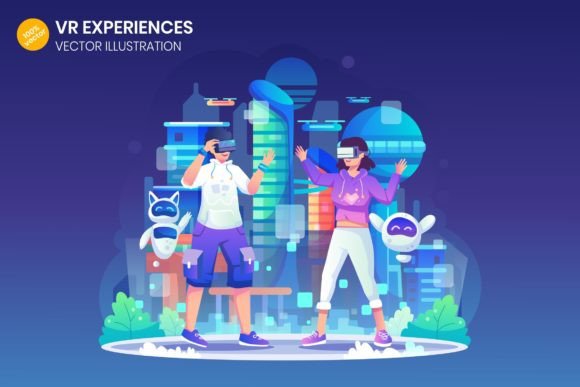
Imagine you need a perfect image to represent a modern, tech-driven concept like virtual reality gaming. You search for photos, but they feel too specific, or maybe you find a 3D render that doesn’t quite match your brand’s clean aesthetic. This is where a VR Experiences Flat Illustration shines. It’s a versatile, stylized artwork, typically created in a vector format, that simplifies a complex idea into clear, appealing visual communication.
Why Flat Design Works for Tech Concepts
A flat illustration strips away shadows, gradients, and excessive texture to focus on core shapes, colors, and composition. For topics like VR gaming, this minimalist approach has distinct advantages. It avoids the clutter of a hyper-realistic image and instead presents the idea in a way that’s instantly understandable. The illustration of a young character floating in a VR headset, holding a gamepad, isn’t just a scene—it’s a symbolic representation of immersion, freedom, and digital interaction.
This style resonates because it feels contemporary and approachable. It doesn’t intimidate the viewer with technical detail but invites them into the concept. For marketers, educators, or bloggers explaining virtual reality, such an illustration acts as a friendly visual anchor, making an advanced topic feel more accessible to a broad audience.
The Practical Power of Vector Graphics
The true value of this specific VR Experiences Flat Illustration lies in its technical foundation as a 100% vector graphic. Unlike a standard photo or a raster image (like a typical JPG), a vector graphic is built from mathematical paths, not pixels. This means you can resize it to any dimension—from a tiny mobile icon to a massive billboard banner—without any loss in quality. The edges stay crisp, the colors remain solid, and the image never becomes blurry or pixelated.
For a professional working on diverse projects, this scalability is a game-changer. You receive a single asset that contains multiple file formats: Adobe Illustrator .AI for deep editing, SVG for web development, EPS for print workflows, and high-resolution PNG/JPG for quick placement. Having the editable source file means you can tailor the illustration to your exact needs. You can change the character’s shirt color to match your brand palette, adjust the background, or even separate elements to use in an infographic. It’s a toolkit, not just a picture.
Real-World Applications Across Industries
Let’s explore where such a versatile illustration can make a tangible impact. A freelance web designer might use it as a hero image on a landing page for a VR game review site, instantly conveying the site’s theme. A small business owner creating an online course about future technologies could embed it in promotional emails and presentation slides to visualize the content. An app developer could utilize elements from the illustration within the UI of a companion app for a VR headset.
Consider these specific use cases:
- Educational Content: An educator creating a module on emerging tech can use the flat illustration in digital handouts. Its clear style helps students grasp the concept before diving into technical specifications.
- Marketing Campaigns: A marketer needs consistent visuals across a Facebook banner, a blog post, and a printed event flyer. The vector file provides one asset that fits all these mediums perfectly, ensuring brand coherence.
- Prototyping & Pitch Decks: An entrepreneur pitching a VR-related startup idea can incorporate the illustration into their Adobe XD prototype or investor deck. It conveys the market and product concept professionally without requiring costly custom artwork at the early stage.
Key Considerations Before Using Flat Illustrations
While the benefits are clear, it’s wise to approach with a few considerations in mind. First, assess the stylistic fit. Flat illustration has a specific modern tone. It might not suit a project aiming for a classic, gritty, or overly romantic feel. Ensure its clean aesthetic aligns with your overall design language.
Secondly, understand your own technical needs. If you only require a static image to place in a document, the provided PNG or JPG files are sufficient. However, if you anticipate needing customization—like altering the VR headset design or translating the text label into another language—you’ll need access to software like Adobe Illustrator and a basic familiarity with vector editing. The “easy to customize” claim hinges on having the right tools and some foundational skills.
Finally, think about narrative context. A powerful illustration like this tells a story of engagement and innovation. Use it where that story supports your message. It might be less effective for a page detailing hardware troubleshooting but perfect for a section discussing user experience or the joy of virtual exploration.
Bringing Ideas to Life
Ultimately, a well-crafted VR Experiences Flat Illustration is more than decoration. It’s a functional component of your communication strategy. It bridges the gap between an abstract technological concept and your audience’s understanding. For the hobbyist blogger, it adds polish. For the corporate designer, it saves time and ensures quality. For the educator, it provides a clear teaching aid.
By choosing such a resource, you’re not just downloading an image; you’re acquiring a flexible visual solution that can grow and adapt with your project. It empowers you to present the exciting world of virtual reality gaming in a way that is both professional and profoundly human—focusing on the experience, the user, and the boundless potential of the digital frontier.